
If you work in a creative field such as photography, marketing, advertising, or graphic design, you have likely used a variety of tools throughout your career. You may even have some favorites.
Some of my favorite creative tools, whether for professional projects or personal endeavors, include Canva, content planning tools, and Adobe Lightroom. Check out my favorite creative tools, their features, and why I like using them.
1. Canva
Canva is the perfect tool for graphic designers, social media managers, marketers, or a creative soul’s playground for everything design and content creation.
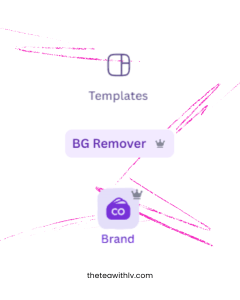
Design Templates
If you’re creating content every day, you’ve likely encountered a mental block at some point. Canva’s design template tool can be your best friend when you’re unsure where to start. It allows users to browse through various design templates and customize them to suit their own brand and style. Additionally, you can resize the designs for any social media platform.
Background Remover
If you’ve been in the design world for a while, you’re likely familiar with Adobe Photoshop or Adobe InDesign. In the past, Adobe was the go-to for graphic design. If you didn’t know how to remove a background in Photoshop, your content likely didn’t turn out as well as you had hoped.
While Photoshop and InDesign are powerful programs, they require a bit more practice than Canva. Canva includes an automatic background remover tool that makes this task much easier. Users also have the option to use the traditional “brush” feature if they’re not completely satisfied with the automatic results, allowing for manual adjustments.
The Brand Tool
The Brand Tool is the spot to store all your brand assets. Like logos, brand colors, or brand fronts. If you manage multiple social media pages or create content for different companies, you have the option to create multiple brand kits.
2. Content Planning
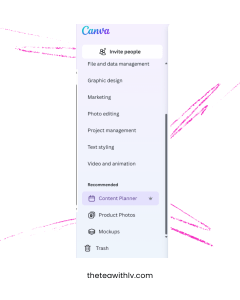
Canva’s Content Planner
If you are focused on growing a business’s social media presence or enhancing your personal social media accounts, the Content Planner app can help you stay organized, strategize, and manage deadlines effectively. The Content Planner tool allows users to schedule their posts by date, time, and social media platform.
This tool is excellent for generating design ideas since it highlights international and national days. For example, it recognizes events like National Pancake Day and World Smile Day. This feature can help inspire creativity, especially when you’re unsure about what to post.
Create Your Own Schedule
While I prefer Canva’s Content Planner, it may not be everyone’s cup of tea.
Create your own schedule in whatever format works best for you. This could be as simple as making a table in Word or as detailed as designing a schedule in Excel. By creating your own schedule, you have more flexibility during the planning process. You can include your thoughts and potential content ideas while also planning the dates and times for posting scheduled content.

3. Adobe Editing Tools
Lightroom
Graphic designers are familiar with Adobe Creative Cloud, which contains all the essential Adobe design tools in one place. Among the various tools available, my personal favorite is Lightroom.
Lightroom holds a special place in my heart. With my love for photography, design, and creativity, it has become my most frequently used editing tool. This software is available for both mobile devices and desktops, but I prefer to design and edit on my iPad. The experience feels much more hands-on that way.
Lightroom can be downloaded for free, allowing users to access basic features without cost. For more advanced editing and design tools, users have the option to subscribe to a premium package.

Try It Out!
Working in the design field can be challenging. The vision you have for a project may not always align with the final product. You will encounter various opinions regarding elements such as photo layouts, font choices, or templates used.
Addressing feedback proactively with the right tools can make the revision process smoother. Tools like Canva, a content planner, and appropriate editing software can significantly support you on your creative journey. Consider using these tools when working on your next design to see the benefits for yourself.
 theteawithLV
Leave a comment